Author: vedant kapoor

  • Recognising and Preventing Phishing Attacks at AK Jwwels

    A Message That Looks Real
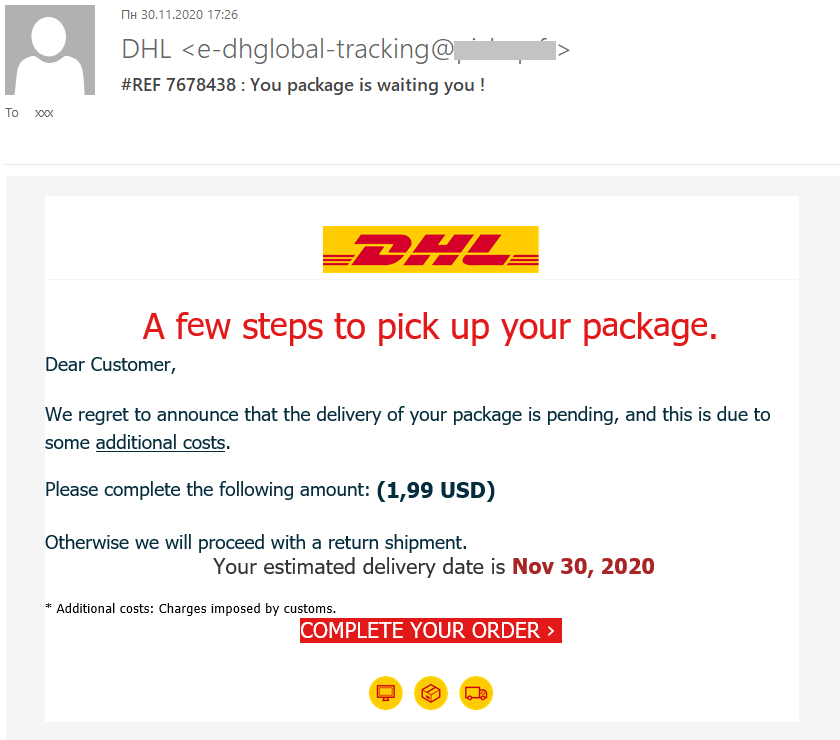
    On a particularly busy Monday morning at AK Jwwels, one of our employees receives a message, looking like it’s from a courier company, saying that a customer’s jewellery order can’t be delivered until they pay a small delivery fee, they need to click this link now. It looks legitimate, it has the courier company logo, a tracking number and looks very professional.

    The email is a phishing scam actually, they want the employee to give them login credentials to steal payment information. If the employee doesn’t check the identity of the sender, the business risks losing access to important accounts, leaking information about customers and financial loss. (Federal Trade Commission [FTC], 2018).

    What Is Phishing?

    Phishing is a cyber-attack where scammers pretend to be a trusted organisation or individual to trick people into handing over sensitive information or doing something that benefits the scammers (National Institute of Standards and Technology [NIST], 2025). They are usually sent in emails, text messages, social media messages or on websites that are trying to look like real ones. The purpose of them is to get login details, passwords, payment information, and other sensitive business data.

    For a small business like AK Jwwels, a phishing scam can lead to business operation disruption, leaked information about customers and damage of the customer trust of AK Jwwels(Federal Trade Commission [FTC], 2018). By understanding how phishing scams work, employees can learn how to stop them.

    Why AK Jwwels Is at Risk

    AK Jwwels relies on digital communication channels on a daily basis to communicate with its customers, suppliers and delivery people. Employees use Instagram, email and WhatsApp often; they send them to discuss custom jewellery orders, organise payments, and talk about when and where to deliver.

    Sometimes, it’s difficult to tell if a message is real. Scammers take advantage of this as they can pretend to be a courier company, supplier or an existing customer and send them messages to steal information or redirect payments to their bank accounts. (Federal Trade Commission [FTC], 2018)

    A successful phishing attack can result in financial loss, unauthorised access to the business’s accounts, leaked information, and damage to the customer trust Cyber Security Centre [ACSC], 2023) that AK Jwwels has built with its customers. All staff at AK Jwwels is expected to be alert to security issues like these.
    How to Recognise a Phishing attempt

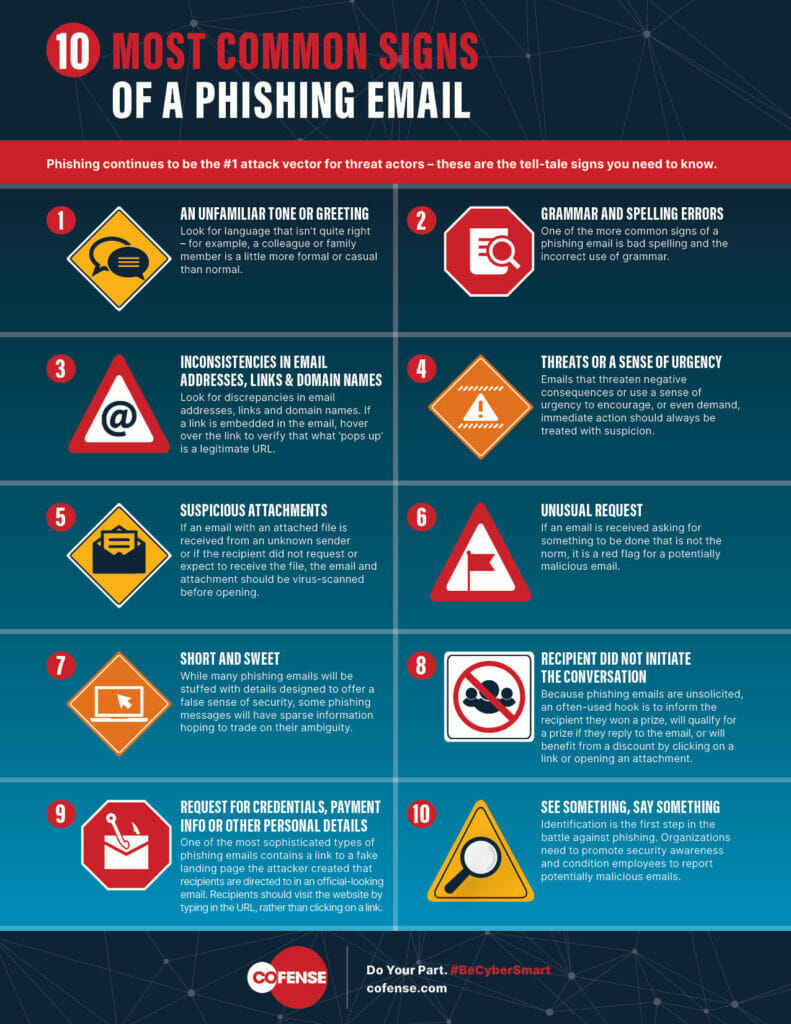
    A phishing attempt aims to look convincing, so it might not be easy to tell if a communication is genuine or not. Employees should always pause and look out for potential phishing red flags before responding to emails, messages or social media messages.

    Typical warning signs include(ACSC, 2023; IT Strategic, 2025):

    • Unsolicited emails or messages, requesting urgent action
    • Requests for a password, a one-time verification code or payment information
    • An email address or username that is almost but not exactly right
    • The URL on the page, which does not lead to the official website of a company
    • Unexpected attachments from an unknown sender
    • Grammar, spelling or formatting that is slightly off
    • Requests to change payment or bank details, without confirmation from the person concerned

    If any of these warning signs appear, employees should stop and confirm with the sender of the message.

    What Employees Should Do

    If an employee receives a message, do not open it, click on any link, or attachments before checking with the sender. Confirm the sender’s identity using an established contact method, such as a telephone number or the official website of the company or individual(Federal Trade Commission [FTC], 2018). Don’t share passwords, one-time verification codes or confidential business information with them via email or any other messenger service. Report the suspected phishing attack to AK Jwwels, who can take appropriate action. While these steps may seem straightforward, they can help safeguard AK Jwwels, its customers and its good reputation against phishing scams.

    Key Takeways

    Phishing attempts succeed because they can fool people into acting in the interest of the cyber criminals, but they can be prevented with employee awareness. By spotting warning signs, verifying questionable requests and reporting potential scams, employees can help AK Jwwels avoid becoming a victim of phishing scams, data leaks and loss of customers. Staying alert to phishing attempts and adhering to secure online practices will help to ensure that AK Jwwels stays safe.

    References

    Australian Cyber Security Centre. (2023). Small business cyber security guide. Australian Signals Directorate. https://www.cyber.gov.au/sites/default/files/2023-07/acsc_small_business_cyber_security_guide.pdf

    Cybersecurity and Infrastructure Security Agency. (n.d.). Teach employees to avoid phishing. U.S. Department of Homeland Security. Retrieved July 26, 2026, from https://www.cisa.gov/audiences/small-and-medium-businesses/secure-your-business/teach-employees-avoid-phishing

    Federal Trade Commission. (2018, November 29). Cybersecurity for small business: Phishing. https://www.ftc.gov/business-guidance/blog/2018/11/cybersecurity-small-business-phishing

    IT Strategic. (2025, September 15). Top 3 small business cyber crimes & prevention tips. https://www.itstrategic.com.au/it-explainer/2025/9/15/top-3-cyber-crimes-impacting-small-businesses

    National Institute of Standards and Technology. (2025). Phishing. U.S. Department of Commerce. https://www.nist.gov/itl/smallbusinesscyber/guidance-topic/phishing

    Cofense. (n.d.). 10 most common signs of a phishing email. https://cofense.com/knowledge-center/10-most-common-signs-of-a-phishing-email

    Shcherbakova, T. (2021, January 11). Delivery payment fraud. Kaspersky Official Blog. https://www.kaspersky.com/blog/delivery-payment-scam/38281/
  • AK Jwwels: How to Use Strong Passwords and Multi-Factor Authentication (MFA)

    A small incident with large consequences

    It’s a busy Friday afternoon at AK Jwwels. An employee signs in to the company email using the same login details as those used for several shopping websites. One of those websites had a data breach a few months ago, which allowed criminals access to thousands of usernames and passwords.

    Criminals use automated tools to test leaked passwords at other online sites. Because the AK Jwwels employee has used the same password on those sites, they are able to access the business email. They read customer enquiries, change passwords on other business systems, and try to divert customer payments into their own bank accounts.

    The incident could have been avoided by using a unique password for the email and enabling multi-factor authentication (MFA).

    Why secure passwords are important

    Passwords are the first defence for almost every business system. They are used to access business email, banking, file storage systems, customer databases and business social media accounts. If a password is compromised or used on multiple websites, criminals can often breach businesses without any hacking skills.

    Strong passwords reduce the risk of unauthorised access to business systems. If passwords are not reused across multiple websites, only the breached account will be compromised and not other business systems.

    For a business like AK Jwwels, the security of their customer data and maintaining the trust of their customers is just as important as protecting their goods in store. Being unable to access the business email, banking system and customer information may cause disruptions to daily business operations, delays to customer orders, and damage to the reputation of the business. (Australian Cyber Security Centre [ACSC], 2025)

    What is multi-factor authentication (MFA)?

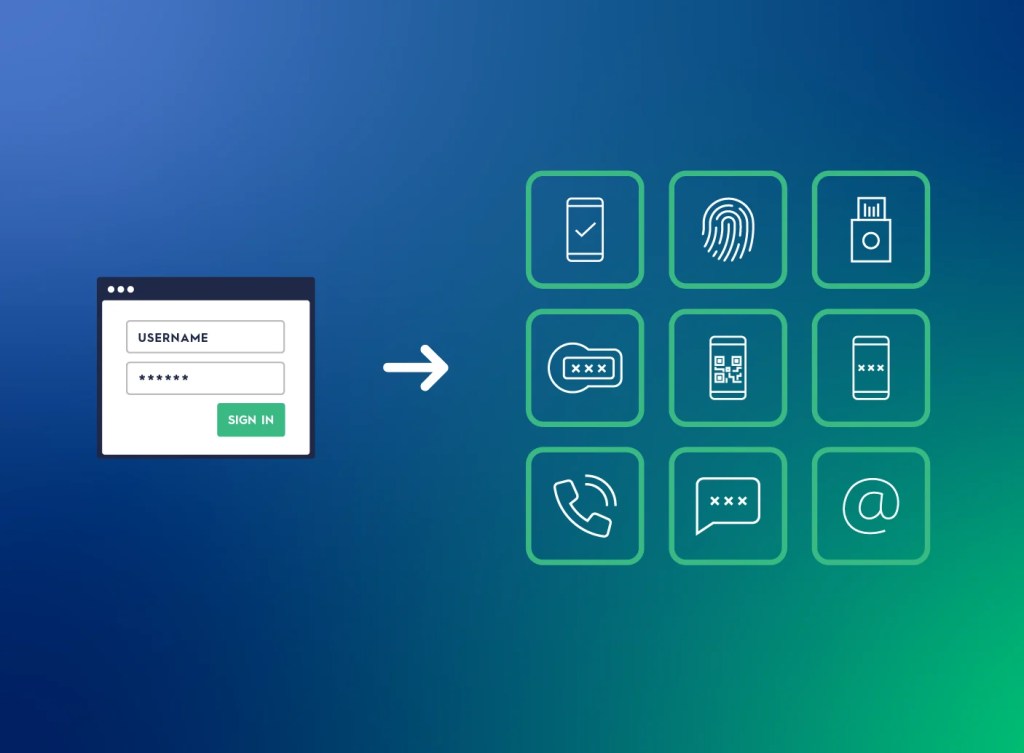
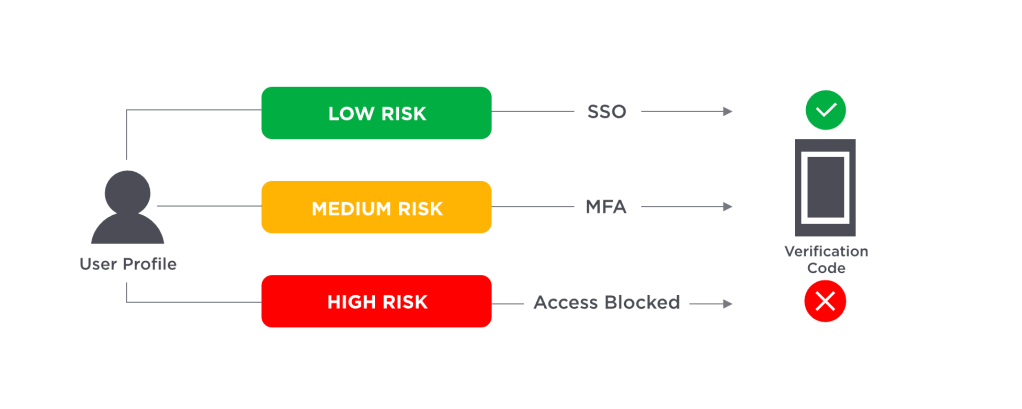
    Multi-factor authentication (MFA) is an additional security feature that helps to protect accounts, requiring more than just a password in order to log in. In addition to a password, MFA may require the user to approve a notification sent to their mobile device, to enter a one-time passcode, or to use biometric authentication such as a fingerprint.(ACSC, 2023)

    Even if a criminal were able to steal a password using a phishing email or from a leaked database, they would still be unable to access the account without going through an additional step. This significantly lowers the risk of business accounts being accessed by a criminal.(ACSC, 2023)

    Why should AK Jwwels use multi-factor authentication?

    AK Jwwels uses many websites, such as business email, social media (Instagram and WhatsApp), cloud storage, internet banking and supplier accounts. These business systems are used to receive enquiries, pay suppliers and store invoices, customer enquiries and customer payment details.

    If a criminal is able to access even one of these accounts, they may be able to access customer information, request changes to payment details, or even impersonate the business, leaving employees locked out of these systems.

    Enabling multi-factor authentication on all the business systems used at AK Jwwels provides an additional layer of protection, making it harder for criminals to gain access to business systems even when a password has been compromised.

    Tips for employees

    Every employee at AK Jwwels should use the following password security measures:

    • Create a unique and hard-to-guess password for each business account
    • Do not use birthdays, names or simple words
    • Keep passwords in a secure, online password manager
    • Enable multi-factor authentication wherever possible
    • Do not share passwords via emails, text messages or messenger apps
    • Change your password if there are signs you have been targeted

    (ACSC, 2025)By using these password security measures, businesses and customers will be better protected against cybercriminals.

    What can you do?

    Employees can protect your business by changing your password and enabling multi-factor authentication immediately if you have been notified of a suspicious login attempt or think your password is compromised. In addition, report the incident to the business owner or a manager you trust.

    If you suspect you have been targeted, check your recent activity. Let customers know if you suspect your account has been used to impersonate AK Jwwels and gain access to customer information.

    By taking these measures, the risk of financial loss and damage to AK Jwwels can be minimised.

    In summary

    Strong passwords and multi-factor authentication are two of the simplest and most powerful security measures that small businesses like AK Jwwels can use.

    Passwords are the first layer of security, however multi-factor authentication (MFA) adds another layer of security. Accounts are safer even if a password has been compromised.

    Employees should create unique passwords for every business system used at AK Jwwels, use MFA wherever possible and remain vigilant against suspicious login activity to protect customer information, maintain business operations and build customer trust.(ACSC, 2025)

    Refrences

    Australian Cyber Security Centre. (2023). Protect yourself: Multi-factor authentication. https://www.cyber.gov.au/sites/default/files/2023-03/ACSC%20-%20Protect%20Yourself%20-%20Multi-factor%20Authentication%20Guide.pdf

    Australian Cyber Security Centre. (2025). Small business cyber security guide. https://www.cyber.gov.au/sites/default/files/2025-01/ACSC_Small_business_cyber_security_guide_January_2025.pdf

    Rublon. (2026, May 14). What is multi-factor authentication (MFA)? [Infographic]. https://rublon.com/what-is-multi-factor-authentication-mfa/

    OneLogin. (2026, March 25). What is multi-factor authentication (MFA) and how does it work? [Diagram]. https://www.onelogin.com/learn/what-is-mfa